June 18, 2025

 Production Brief
Introduction:
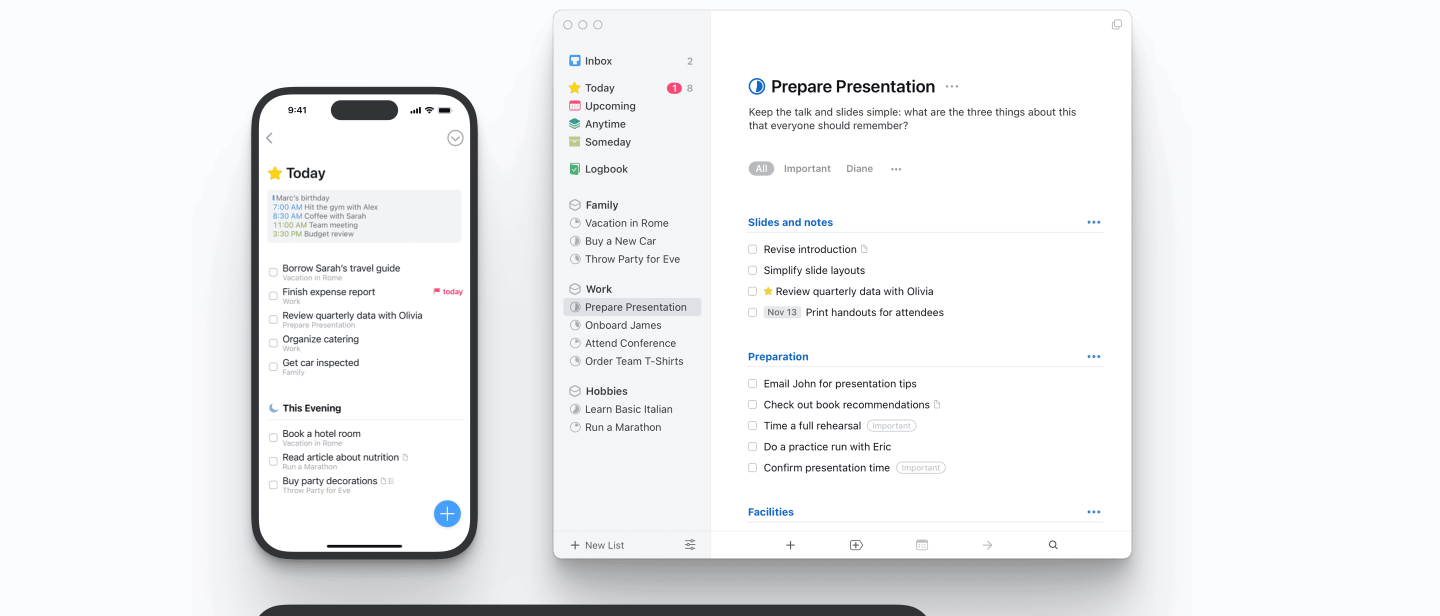
I’ve spent way too much time trying to figure out how to get things done, and ironically, half of that time was wasted bouncing between apps that were supposed to help me do exactly that. I’m talking about Things, Todoist, and the deceptively simple Apple Notes. All three promise productivity. All three say they’ll change your life. But only one has actually stuck for me — and there’s a reason why.
Table of Contents
Key Takeaways
| App | Best For | Pricing |
|---|---|---|
| Things | Mac/iOS users who want simplicity with power | One-time purchase |
| Todoist | Gamified productivity lovers | Subscription-based |
| Apple Notes | Basic users looking for free integration | Free |

1. Things App
Pros:
- One-time payment (no subscriptions, hallelujah)
- Polished interface that’s almost therapeutic
- Works beautifully on Mac, iPhone, and iPad
- Great for structured workflows and recurring tasks
Cons:
- Only available for Apple users
- No native Android or Windows support
- Collaboration is very limited

2. Todoist App
Todoist is the app that makes you feel productive even when you’re not. That’s both the beauty and the trap. The gamification — with its karma levels and streaks — is addictive. But that can easily become a rabbit hole where you’re optimizing your productivity system instead of, you know, doing the actual thing.
Pros:
- Cross-platform support: iOS, Android, web, Windows, you name it
- Gamification keeps motivation high
- Excellent for team collaboration and shared projects
- Powerful filtering, labels, and templates
Cons:
- Subscription model (starts at $4/month billed annually)
- Can become overwhelming with features
- Easily leads to “productivity theater”

3. Apple Notes
Apple Notes is like that friend you’ve known forever — reliable, a little plain, but always shows up. It’s free, deeply integrated with Apple’s ecosystem, and even works with Siri (“Hey Siri, create a note…”). I gave it a real try, mostly because of how fast it syncs across my devices and how dead simple it is to capture thoughts.
Pros:
- 100% free and pre-installed on Apple devices
- Works great with Siri and native scheduling apps
- Syncs instantly with iCloud
- Supports rich media and checklists
Cons:
- Limited for structured task management
- Minimal integration with third-party automation
- Harder to build a daily system around it

4. Final Thoughts
If you’re trying to decide between Things, Todoist, and Apple Notes, it really comes down to your style. Are you a minimalist who just wants a focused tool? Go with Things. Need cross-platform collaboration and don’t mind a few dopamine hits from productivity karma? Todoist’s your jam. Want dead-simple, free, and native to your iPhone or Mac? Then Apple Notes will do the trick.
Me? I’ve tried ‘em all, but I keep coming back to Things. It doesn’t shout. It doesn’t nag. It’s just there, quietly keeping my brain from melting. And I only paid once for it. That’s a win in my book.


